RSS
This blog is about my experience with N73. Im sharing softwares, themes, games, and every tips and tricks related to N73.

Sharing is caring, if you have any question or have something to share with me. Please email to n73diary@gmail.com
Showing posts with label How to. Show all posts

Saturday, January 30, 2010

NoRedClose for symbian 3rd

All symbian phone has the red button like picture above. The red button enable you to End or Close any call instantly. It also enable you to close any application or game instantly.

The red button can be quite annoying sometimes because we usually will accidentally press it at the wrong time. I have some bad experiences with the red button. When Im playing games in final stage with my N73 but accidentally press the red button.....the whole game closed instantly and i have to play it all over again..Damn!

Now you can fix that problem. With NoRedClose, you can disable your red button, your red button will only work when you are in call. So whenever you are playing game or using any application with your phone, you never have to worry pressing the wrong button again!

After install the application, open it and let it run in background to disable red button. You can always enable the red button by exit the NoRedClose application.

This is unsigned version, so you will need hacked phone to install.
How to Hack your N73 in 5 minutes.

Download from rapidshare
Download from megaupload

Enjoy! Please spend 1 sec to click on my ads as token of appreciation. Thanks :)
If you find my post useful and wish to say thanks, please click on my ads.

Tuesday, January 19, 2010

Zensis Theme DIY v1.50

Theme DIY that lets you create your own personal theme right on your Nokia S60 phone! Get a new look for your Nokia phone in a few minutes! Pick any photo, choose from 6 theme templates, store up to 12 personalized themes, and bring a new look on your phone instantly. Changing theme has never been more easy and fun! Theme DIY for Nokia Symbian Series 60 is a very user friendly tool to create themes right on your mobile phone. It's really a must-have for every S60 phones.

This is unsigned version, so you need hacked phone to install it.
How to hack your N73 in 5 minutes.

It might take some time to install, please be patient.
Download from rapidshare
Download from megaupload

After install, register with 5 digit number : 00000

Follow these easy steps to create your own theme in minutes!
  1. Select 1 of the 12 available theme slots. You can save up to 12 personal themes using these slots.
  2. After you selected a slot, you can personalize your themes here.
  3. You can choose theme template, theme name, background image, music player image, ringtone etc. here. There are 6 templates choices. Each with different text color and style.
  4. Preview the look and feel of a template before you decide.
  5. [Optional] Name your theme. It supports any languages input.
  6. Select two photos from your phone; one [Optional] as background image another as music player background.
  7. (N95 does not support music player background)
  8. [Optional] Select Fade Out / Blur as the menu background effect. So you can read menu text easier.
  9. [Optional] Select a music file as the theme's ringtone.
  10. Preview the final output before you save.
  11. When all settings are made, you can save the theme now.
  12. After save, we will jump tot the default Theme application, where you will find you newly created theme there. Choose apply and your theme will be used on the phone.
  13. Now you have a cool personal theme!
  14. Create another one with Theme DIY today!
If you would like to say thank, please click on my ads.

Sunday, January 17, 2010

Nokia Secret Codes

I found these code on the internet, some of them i already knew, but some of them i never see before.
Warning: Make sure you know what you are doing before trying these code.

*#0000#
Displays firmware version and date, Phone Model and Operator Variant

*#06#
Displays International Mobile Equipment Identity (IMEI Number).

*#7780#
Soft Reset: Restore factory settings.

*#7370#
Deep Reset: Removes everything and puts the phone right back to factory settings.

*#73#
Reset phone timers and game scores.

*3370#
Activates Enhanced Full Rate Codec (EFR). Phone uses the best sound quality but talk time is reduced by approx. 5%

#3370#
Deactivate Enhanced Full Rate Codec (EFR).

*#4720#
Activate Half Rate Codec - Phone uses a lower quality sound but you should gain approx 30% more Talk Time.

*#4720#
Deactivate the Half Rate Codec.

*#7760#
Dispalys Manufactures code.

#pw+1234567890+1#
Provider Lock Status.

#pw+1234567890+2#
Network Lock Status.

#pw+1234567890+3#
Country Lock Status.

#pw+1234567890+4#
SIM Card Lock Status.

*#2640#
Displays phone security code in use.

*#30#
Lets you see the private number(????).

*#746025625#
Displays the SIM clock status.

*#67705646#
Phone code that removes operator logo on 3310 & 3330.

*#43#
Allows you to check the "Call Waiting" status of your cell phone

*#61#
Allows you to check the number that "On No Reply" calls are diverted to.

*#62#
Allows you to check the number that "Divert If Unreachable (no service)" calls are diverted to.

*#67#
Allows you to check the number that "On Busy Calls" are diverted to.

*#92702689#
Takes you to a secret menu where you may find some of the following informations: Displays Serial Number, Date Made, Purchase Date, Date of last repair, Transfer User Data. To exit this mode switch your phone off then on again.

*#94870345123456789#
Deactivate the PWM-Mem.

**21*number#
Turn on "All Calls" diverting to the phone number entered.

**61*number#
Turn on "No Reply" diverting to the phone number entered .

**67*number#
Turn on "On Busy" diverting to the phone number entered .

*#2820#
Bluetooth device address.

*#62209526#
Display the MAC address of the WLAN adapter.

12345
This is the default security code.

*#7328748263373738#
Resets security code

NOTE: Some of these codes may not work

Thursday, January 14, 2010

How to send email via your phone without connecting to the internet

I found this interesting trick on the internet. Now u can send email via your phone without connecting to the internet. Here how it work, you don't need any software, just use sms.

  1. Open a new message
  2. Enter the recipient Email and give one space than write message u want to send
  3. Send it the this number: +447747782320
Now ur message will be sent as an email. Check your mailbox, it should be reach within 10 minutes. I tested myself, it reach within 1 minute.

Tested, 100% working!

Reminder: This trick Will cost u ISD SMS COST Depends on ur service provider..

This trick works with any phone, as long as your phone can sms, it will work! Enjoy!
You might need to use this trick in case of emergency!

If you find this post useful and like to thank, please click on my ads.

Friday, January 8, 2010

How to make your N73 a Torch

One of the most important tool that we never bother to carry in our pocket is a torch light. Imagine what will happen when we are in a place which there are no light and dark, a torch light always a handy tool for it.

Since cellphone had becoming a very common tool in our daily life, it is very important for the cellphone to have basic function like torch light. Unfortunately, there are no official release of software from nokia that enable us to use the flash as a torch.

Today im introducing two software which make your N73 a torch light. It will work for other symbian 3rd phone too.

1. NTorch Lite v.1.0

This software enable you to use your camera flash light as a torch. It will keep the flash light on. Pretty handy when you are in a electric blackout. NTorch Lite can also save your life in an emergency. By blinking the camera flash light with internationally recognized SOS pattern.

Download from rapidshare
Download from megaupload

UNLOCK CODE: 25600
please enter the correct unlock code on your first attempt to open the software after install. Or else you will need to reinstall again if you enter the wrong code.

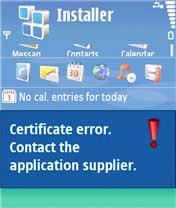
This software is quite old already, if you get certificate expired error, try reset phone date to 8/25/2007. Or you can just Hack your phone so there will be no more limit on certificate date, you can install any software you want.
How to Hack your N73 in 5 minutes.


2. Fun Torch

This software will turn your screen into torch light. You can manually set the colour of your screen. It is a freeware, enjoy!

Download from rapidshare
Download from megaupload

Enjoy! If you feel want to thanks, please click on my ads.

Monday, December 28, 2009

How to play Java game/application on your PC

There are a lot of free java games and applications on the internet. Imagine you just download a java game pack which contain hundred of java games, but not all of them are really fun or playable. Each time you want to try out a java game or application, you need to transfer it into your phone then install it. If you don't like the game, you have to uninstall it again. The process is very troublesome and time consuming.

Now you can try all your java game/application on your PC. It will save you a lot of time. Now you can try it on your PC before determine which one you want install on your phone.

This emulator is called SJboy. Just download and install. It work for any java game/application Enjoy!


Download from rapidshare
Download from megaupload


Check on the read me for more info after you install.

Thursday, December 24, 2009

How to silent/disable shutter sound of N73 camera

By default, when you taking photo with N73 camera, it automatically will produce a shutter sound. With N73 powerful speaker, the shutter sound can be quite annoying and embarrassing specially when you taking picture inside a room of people. The shutter sound can't be disable if you are from Asia-Pacific region. This is because the laws here said so. [To avoid people taking your personal photo without your notice]
Since i bought N73 ME, i been searching all over internet for the solution to turn off the shutter sound. Finally, i found it! I would like to share it with you now.

You only need to install this software into your N73. It will automatically run on the background. Your phone will be functioning just like normal. When you want to turn off the camera shutter sound, you just switch to silent mode, that all!

Download
from megaupload
Download from rapidshare

This software is unsign, therefore you need to hack your phone so you can install it. But don't worry, hacking your n73 is just a piece of cake. Just follow my tutorial, no sweat.
How to hack N73 in 5 minutes

Enjoy!
Please spend 1 sec to click on my ads as token of appreciation. Thanks :)

Tuesday, December 22, 2009

How to download map to your N73 Nokia Map?


First of all, make sure your N73 has the Nokia Map software. By Default, it is installed inside your phone. Check inside your N73 application folder>Maps for it. When you open your Nokia Map, it will not show any map.Don't panic, by default Nokia Map don't have any map in it's directory. You have to download it by yourselves.

If by any rare chance that you don't have the Nokia Map software, you can download it from Nokia Map 2.0. Install it on your phone.

If you already have the Nokia Map on your N73. Please continues...
  1. You will need a software call Nokia Map loader. Download it and install on your computer.

  2. After the installation, plug your N73 to your computer with the data cable. Choose PC Suite in your phone. Make sure your Nokia PC Suite detect it. Now you can open the newly install Nokia Map loader. You will see the GUI like below.


  3. From the list, choose the map you want to download. I want to download map of Malaysia, so i choose Asia>Malaysia and click on the "+" button besides Malaysia to add it into the list.


  4. After you have select all the map you want. Click on the Download button and wait for the process to finish.

  5. Ok, now you are done. Open your nokia map on your N73 and start to check your map. It will be available now! If you still find your Nokia map showing blank, try use the zoom in and out function. Cheer!


    Ok, now you are done. From the nokia map loader, you may also download the voice of nokia map according to language of your preferences. Enjoy!

    Please spend 1 sec to click on my ads as token of appreciation. Thanks :)

Sunday, December 20, 2009

How to change your N73 to N73 ME


Changing N73 to N73 ME is an easy step. There are two things that you need to know
  1. Changing the Product Code [about product code]
    To change your phone to N73 ME use the following product code:
    EMEA version of the N73 Music Edition:
    0537289 Euro 1
    0539193 France
    0539207 Alps
    0539239 Euro 2
    0539256 Turkey
    0539265 South Africa
    0539269 Scandanavia
    0539278 Baltains
    0539279 Russia
    0539284 Ukraine
    0539285 Bulgaria
    0539289 Hungary
    0539291 Balkans
    0539293 Greece/Cypurs
    0539294 Lebanon
    0539295 Gulf
    0539298 Israel
    0539299 Romania
    0539341 Belarus


    APAC version of the N73 Music Edition:
    0539343 -> APAC 1 ...Chinese, English
    0539346 -> Philippines ...English, Indonesia, Malaysia, Philipino
    0539349 -> Australia/New Zealand ...English, Indonesia, Malaysia, Philipino
    0539352 -> Indonesia ...English, Indonesia, Malaysia, Philipino
    0539354 -> India/Vietnam ...English, Indonesia, Malaysia, Philipino
    0539351 -> Thailand ...English, Thai

  2. Update N73 Firmware with Nokia Software Updater [How to update?].
Please Leave Comment if you have any questions.

    How to update N73 firmware with Nokia Software Updater

    Before we start the tutorial, you should read the FAQ of firmware Update first.

    There are two method to update your phone firmware. Either with Nokia Software Updater(NSU) or with Pheonix. This tutorial will teach you how to update your firmware with Nokia Software Updater (NSU).

    Update N73 firmware with NSU is a very easy process. First of you will need
    1. Computer - recommended to use Laptop
    2. Data cable of N73
    3. Internet connection
    4. Nokia Software Updater (NSU) Download
    5. Nokia PC suite Download
    6. Nemesis Service Suite (NSS) Download
    7. Your N73 will Full Battery Charged
    Tutorial
    1. First of all prepare yourselves a laptop or PC with internet connection. Download the latest version of Nokia PC Suite, Nokia Software Updater, and Nemesis Service Suite. Make sure you have the latest version of them if you are using Windows 7.

    2. Install Nokia PC Suite and Nemesis Service Suite(keep pressing next during installation). After install both software, plug your N73 with data cable to your computer, choose PC Suite. Make sure Nokia PC Suite detect N73 phone. If you need your data please backup all your data like contact, image, video, music, document..etc.

    3. This step is for those who want to change their product code.
      Why change your product code?[Product Code List]
      Open Nokia PC Suite>setting>manage connections. Untick everything on the List. After that, the Nokia PC Suite will show your N73 had disconnected.

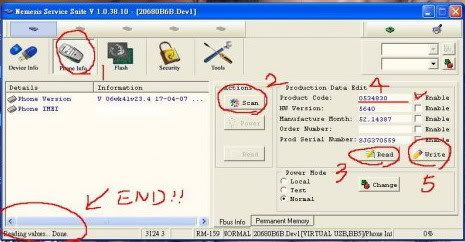
      Open Nemesis Service Suite, choose scan for new device>phone info>read(3). Now see your produce code(4).
      To change your product code, first tick the Enable besides your product code(4). Change your product code and click on write(5). Click read again to check if the product code had changed.

    4. Open Nokia PC Suite>setting>manage connections. Tick series cable and USB cable. Make sure Nokia PC Suite show your phone had connected.

    5. Now Install Nokia Software Updater and open it.

      First you will see this the interface. You can see your current firmware version and the version you will be updated.


      Nokia Software Updater will download the latest firmware from server. The time to download will depend on your internet speed.


      After the download had finish, NSU will update the firmware to your phone. Warning: make sure there are no electric blackout or data cable unplug during this process.


      wait till this screen appear and you are done!

    6. Wait for your phone to reboot. press *#0000# on your N73 to check your current firmware. See if it is updated accordingly.

    Thursday, December 17, 2009

    How to solve "No ringtone when receive sms" problem


    Some of us might have face this problem before on N73. I have this problem myself few months ago. When i receive sms, there was no ringtone from my N73(i didn't set silent mode) . I don't know when is the msg received, but it is inside my inbox. It is kinda annoying as i miss many sms and need to keep checking my inbox cause my N73 wont ring.

    After a few try on my phone, i found the problem and solution.
    The problem is there are too much sms in the inbox. I had more than thousand sms insides my inbox and i never bother to delete it. So to solve it:

    1. Delete the old sms on your phone as much as possible.
    2. Restart your phone.

    This should solve the problem, it work for me. Hope it help.

    How to Solve N73 "Memory full. Delete some data!" problem


    Im sure most of the N73 user out there had encounter this problems before. This is the most annoying bug of N73, it shows "Memory full. Delete some data!" error and blocking you from opening sms, contact, application, games...almost everything.

    This bug is cause by Nokia lifeblog which is a stupid application that nobody is using it. The bug was cause by two sources. a file named
    lifeblog.db and a process named LifeblogDBSERVER.exe. The problem is about huge file size of "lifeblog db" file in phones internal memory. Suddenly internal memory falls to 144k due to the large lifeblog.db file in c:\data\lifeblog\database\

    The following tutorial will teach you solve this problem step by step, eliminate it once and for all.

    First of all, you will need 2 software

    JBak Taskman [freeware]
    Download

    X-plore v1.34
    Download


    1. Download and install both application on your phone
      a) Jbaktaskman
      b) X-plore
    2. Open jbtaskman and go to Tools > Processes and look for "LifeblogDBSERVER.exe" file and Terminate the process.
    3. Open X-plore and go to the configuration
      Menu>tools>configuration Or by just pressing 0
      Please make sure the following option is tick:
      Select Show Hidden files
      Select Show Romdrives

      Select Show Ram drives
      Select Show system files/Folders

      now u can go to
      c:\data\lifeblog\database\ and delete lifeblog.db file to free memory.
    4. Now restart phone and repeat step 2
    5. Again go to c:\data\lifeblog\database\ and change the attributes of lifeblog.db file to 'hidden' and 'read only' using x-plore.
    6. Restart phone and search for LifeblogDBSERVER.exe using jbtaskman. hopefully it wont be there to cause any further troubles. ! !
    Please spend 1 sec to click on my ads as token of appreciation. Thanks :)

    How to Format your symbian phone


    A symbian phone is just like a mini computer, it is powerful but easy to mess up or infected with virus if you did not manage it wisely. Formatting a symbian is very easy and can be done in just 1 minute. There are 2 kind of formation. By pressing the number below and wait for it to reboot.

    1.
    *#7780#
    Reset setting
    It will reset your phone program / settings。but will keep the data (e.g. software, image ...)
    It will just reset all your phone setting to default setting.

    2. *#7370#
    Reformat All
    It will totally reformat all data in your phone memory C:
    All data in your phone memory will be gone. [Drive C: will be formated]
    The symbian OS will be reinstall and all setting return to default upon reboot.

    However your memory card is not formated. [Drive E:]

    To format your memory card, you can to go menu>tools>memory>option>Format mem.card

    Personally i recommend you to backup everything important to your PC. After that start to format your memory card then only follow with *#7370# format.

    Both 1 and 2 method will request for a password, the default password is 12345.

    How to Hack your Phone

    Ok, first of all, you must know why you need to hack your symbian phone.

    Had you ever experience getting "certificate error" when trying to install software or game on your symbian phone? The "certificate error" is blocking you from installing all those great applications and games which will greatly enhances your symbian phone experiences. Without 3rd party applications, symbian phone is nothing more than an ordinary phone.

    Hacking your phone is quite safe nowadays and you can done it in just few minutes.
    The following tutorial is 100% working with Nokia N73 [4.0839.42.2.1] tested by myself.

    First you need 4 files
    CProfDriver_SISX.ldd
    Installserver.exe
    Secman v1.10.sis

    X-plore v1.34
    Download:
    http://rapidshare.com/files/321705702/N73HACK.zip
    mirror:

    http://www.megaupload.com/?d=I93K2CIT
    New link!!
    http://www.multiupload.com/2Q6HY7K806

    Easy steps to Hack/unlock your N73
    1. Download the file and unzip to your pc.
    2. Transfer the 4 files to your phone memory card.
    3. install Secman v1.10.sis. When the installation is done, look in

    Wednesday, December 16, 2009

    How to Disassemble Nokia N73

    Want to change the housing of Nokia N73? or want to clean the dirt inside N73? You can't do it, if you don't know how to open the housing of N73.

    This video tutorial will shows you how to disassemble Nokia N73 using simple tools and easy steps.