skip to main |
skip to sidebar
 Changing N73 to N73 ME is an easy step. There are two things that you need to know
- Changing the Product Code [about product code]
To change your phone to N73 ME use the following product code:
EMEA version of the N73 Music Edition:
0537289 Euro 1
0539193 France
0539207 Alps
0539239 Euro 2
0539256 Turkey
0539265 South Africa
0539269 Scandanavia
0539278 Baltains
0539279 Russia
0539284 Ukraine
0539285 Bulgaria
0539289 Hungary
0539291 Balkans
0539293 Greece/Cypurs
0539294 Lebanon
0539295 Gulf
0539298 Israel
0539299 Romania
0539341 Belarus
APAC version of the N73 Music Edition:
0539343 -> APAC 1 ...Chinese, English
0539346 -> Philippines ...English, Indonesia, Malaysia, Philipino
0539349 -> Australia/New Zealand ...English, Indonesia, Malaysia, Philipino
0539352 -> Indonesia ...English, Indonesia, Malaysia, Philipino
0539354 -> India/Vietnam ...English, Indonesia, Malaysia, Philipino
0539351 -> Thailand ...English, Thai
- Update N73 Firmware with Nokia Software Updater [How to update?].
Please Leave Comment if you have any questions.
Before we start the tutorial, you should read the FAQ of firmware Update first.
There are two method to update your phone firmware. Either with Nokia Software Updater(NSU) or with Pheonix. This tutorial will teach you how to update your firmware with Nokia Software Updater (NSU).
Update N73 firmware with NSU is a very easy process. First of you will need
- Computer - recommended to use Laptop
- Data cable of N73
- Internet connection
- Nokia Software Updater (NSU) Download
- Nokia PC suite Download
- Nemesis Service Suite (NSS) Download
- Your N73 will Full Battery Charged
Tutorial - First of all prepare yourselves a laptop or PC with internet connection. Download the latest version of Nokia PC Suite, Nokia Software Updater, and Nemesis Service Suite. Make sure you have the latest version of them if you are using Windows 7.
- Install Nokia PC Suite and Nemesis Service Suite(keep pressing next during installation). After install both software, plug your N73 with data cable to your computer, choose PC Suite. Make sure Nokia PC Suite detect N73 phone. If you need your data please backup all your data like contact, image, video, music, document..etc.
- This step is for those who want to change their product code.
Why change your product code?[Product Code List]
Open Nokia PC Suite>setting>manage connections. Untick everything on the List. After that, the Nokia PC Suite will show your N73 had disconnected.

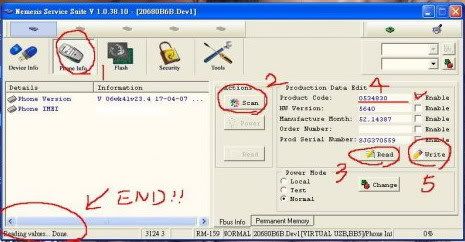
Open Nemesis Service Suite, choose scan for new device>phone info>read(3). Now see your produce code(4).
 To change your product code, first tick the Enable besides your product code(4). Change your product code and click on write(5). Click read again to check if the product code had changed.
- Open Nokia PC Suite>setting>manage connections. Tick series cable and USB cable. Make sure Nokia PC Suite show your phone had connected.
- Now Install Nokia Software Updater and open it.

First you will see this the interface. You can see your current firmware version and the version you will be updated.

Nokia Software Updater will download the latest firmware from server. The time to download will depend on your internet speed.

After the download had finish, NSU will update the firmware to your phone. Warning: make sure there are no electric blackout or data cable unplug during this process.

wait till this screen appear and you are done!
- Wait for your phone to reboot. press *#0000# on your N73 to check your current firmware. See if it is updated accordingly.
Why do i need to change my product code?
Product code identify your phone identity. it give information about region of the phone and edition of the phone. So by changing the product code you can
- Change your phone from one edition to another.
E.g: N73 to N73 ME, N73 to N73 IE, N73 ME to N73 IE...etc
- Change the phone region
E.g: America, Africa, Hongkong, Asia Pasific...etc
- Change the native language support.
By changing the phone region, it automatically change the phone native language support. For example Hongkong support chinese language, Thailand support Thai language.
After changing the Product Code, you need to do a firmware update so the phone can flash new firmware for it new product code. Click here to find how how to change product code and update firmware.Product Code List:
EMEA version of the regular N73:0527009 Euro 1
0529568 France
0529569 Alps
0529602 Euro 2
0529603 Turkey
0529604 South Africa
0529605 Scandanavia
0529606 Baltains
0529607 Russia
0529608 Ukraine
0529609 Bulgaria
0529780 Hungary
0529781 Balkans
0529782 Greece/Cypurs
0529784 Lebanon
0529785 Gulf
0529786 Israel
0529790 Euro 1
0529792 Euro 2
0529793 Turkey
0529794 Balkans
0529795 Ukraine
0529796 Greece/Cypurs
0529797 Bulgaria
0529799 Hungary
0529801 Romania
0529803 Gulf
0529804 Baltains
0529805 France
0529806 Alps
0529807 South Africa
0529809 Scandanavia
0529810 Lebanon
0529811 Russia
0537287 Belarus
0537288 Belarus
0540567 Euro 1
0540575 GulfAPAC version of the regular N73:0529815
0529814 (support chinese)EMEA version of the N73 Music Edition:0537289 Euro 1
0539193 France
0539207 Alps
0539239 Euro 2
0539256 Turkey
0539265 South Africa
0539269 Scandanavia
0539278 Baltains
0539279 Russia
0539284 Ukraine
0539285 Bulgaria
0539289 Hungary
0539291 Balkans
0539293 Greece/Cypurs
0539294 Lebanon
0539295 Gulf
0539298 Israel
0539299 Romania
0539341 Belarus APAC version of the N73 Music Edition:0539343 -> APAC 1 ...Chinese, English
0539346 -> Philippines ...English, Indonesia, Malaysia, Philipino
0539349 -> Australia/New Zealand ...English, Indonesia, Malaysia, Philipino
0539352 -> Indonesia ...English, Indonesia, Malaysia, Philipino
0539354 -> India/Vietnam ...English, Indonesia, Malaysia, Philipino
0539351 -> Thailand ...English, Thai APAC version of the N73 Internet Edition:0539366 - Hong Kong version region 14 (English, Traditional Chinese, Simplified Chinese input)
0539364 - Taiwanese version region 10 (English + Traditional Chinese input)

Before we start, there are some FAQ that you might want to know before proceed to update your firmware. FAQ - What is firmware?
Firmware is the program that run and control your phone. Without firmware, your phone is just like a car without a driver.
- Why do i need to update my firmware?
No product in this world is perfect. There are bugs and problems of phone that only be discover by phone user after the phone had released. Nokia is getting feedback from users and try to fix the problems. So every time they fix and improve the phone, they will release new firmware for user to update it. Update firmware is just like updating your windows.
- Will my data in the phone loss after firmware update?
Yes, your data will be loss. So make sure you do all your backup before firmware update.
- Will my phone continues to support my native language after firmware update?
For those who buy Original N73, it is more likely your phone will remain the same support of language. For those who buy AP phone (Referring to Hand Phone set that is not imported by Authorized Distributor respectively), you might loss support of your native language. But no fear, it is just matter of changing product code. Included in the tutorial.
- Can i change my N73 firmware to N73 Music Edition or N73 Internet Edition?
Yes, you can. It is only the matter of changing the product code. Included in the tutorial.
- What do I gain from firmware update?
Your phone will be much better after firmware update, faster, improve camera, fix bugs, improve sound..etc. The main aim of this tutorial is to teach you to update firmware yourselves at home for free. Of course you can send your phone to any phone shop for update but it might cause you some money.
- What if i fail during the process of firmware update?
This might be cause by improper procedure or electric blackout during updating the firmware. Your phone might not be working if the update fail (unlikely to happen). If this really happen, consider yourselves as the unlucky one, take your phone to nearest Nokia Service Centre, they will flash the firmware for you. Your phone will back to life in no time.
If everything clear, we will proceed to the firmware update tutorial. Click here